FAQ | Label Printers, Disc Title Printer and Stamp Maker
Category : PC software LABEL DESIGN MAKER for Windows
Auto update is not being performed.
Windows 8.1/10
Auto update will not be performed if you select "No" for the "Device Installation Settings."
(1) On the Start menu, right-click, to open the menu. Next, click "Control Panel ".
(2) On the Control Panel dialog box that appears, click "System and Security ".
• If the view is something other than Category, click "System" Go to step (4).
(3) On the System Settings that appear, click "System ".
(4) On the left, click "Advanced system settings ".
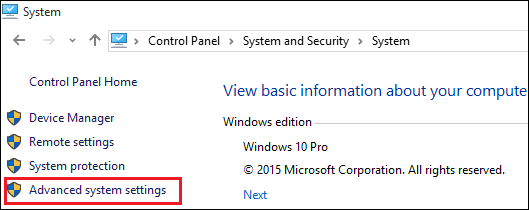
(5) On the System Properties dialog box that appears, select the "Hardware" tab.
(6) Click "Device Installation Settings ".
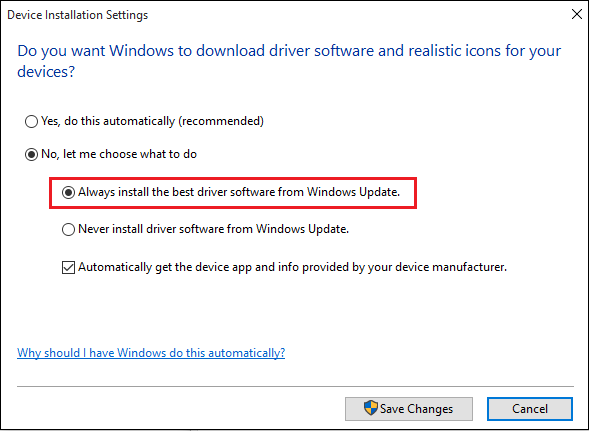
(7) On the Device Installation Settings dialog box that appears, select "Always install the best driver software from Windows Update ".
Windows 7
Auto update is not supported with Windows 7.Please update using the download page.
Auto update will not be performed if you select "No" for the "Device Installation Settings."
(1) On the Start menu, right-click, to open the menu. Next, click "Control Panel ".
(2) On the Control Panel dialog box that appears, click "System and Security ".
• If the view is something other than Category, click "System" Go to step (4).
(3) On the System Settings that appear, click "System ".
(4) On the left, click "Advanced system settings ".
(5) On the System Properties dialog box that appears, select the "Hardware" tab.
(6) Click "Device Installation Settings ".
(7) On the Device Installation Settings dialog box that appears, select "Always install the best driver software from Windows Update ".
Windows 7
Auto update is not supported with Windows 7.Please update using the download page.


