Free Shipping on Watch Orders over $159
FAQ | Label Printers, Disc Title Printer and Stamp Maker
Category : PC software LABEL DESIGN MAKER for Windows
How can I change the wireless LAN settings?(Access Point Mode)
(1)
Connect the printer to your computer using a USB cable.
(2) On the menu bar, click "Settings" and then select "Wireless LAN settings".
(3) Select the printer you want to connect.
(4) Select "Access point connect".
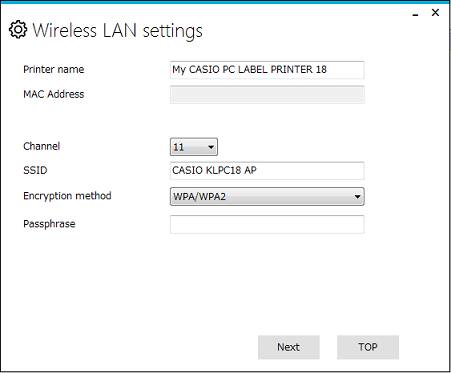
(5) Configure the settings of each item.
Printer name : 1 to 31 characters, single-byte characters only.
Channel : 1 to 13(Initial value 11)
SSID : Shows the wireless LAN connection device.
1 to 32 single-byte ASCII characters.
Space is not allowed as the first character.
Encryption method : none,WPA/WPA2
Passphrase : 8 to 63 single-bye ASCII characters
(6) Click "Next" to exit settings.
(7) When a connection is established, the printer’s wireless LAN lamp lights green.
(2) On the menu bar, click "Settings" and then select "Wireless LAN settings".
(3) Select the printer you want to connect.
(4) Select "Access point connect".
(5) Configure the settings of each item.
Printer name : 1 to 31 characters, single-byte characters only.
Channel : 1 to 13(Initial value 11)
SSID : Shows the wireless LAN connection device.
1 to 32 single-byte ASCII characters.
Space is not allowed as the first character.
Encryption method : none,WPA/WPA2
Passphrase : 8 to 63 single-bye ASCII characters
(6) Click "Next" to exit settings.
(7) When a connection is established, the printer’s wireless LAN lamp lights green.


