










































FAQ | Label Printers, Disc Title Printer and Stamp Maker
Category : PC software All Software
Windows: Why does an error message appear when I try to start up the software?
If the error message below appears on your computer screen when you try to start up the software, it may be due to one of the reasons described below.
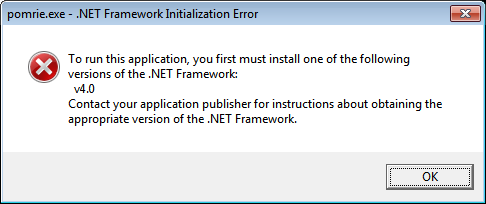
・ Windows® XP SP3, Windows Vista®, Windows® 7
Installation of the application software may have been incomplete because of insufficient space on your computer's hard disk.
Use Windows "Add or Remove Programs" to removes Stamp Maker STC-PC10 from your computer.
After checking to ensure that at least 1GB of storage is available on your computer's hard disk, re-install Stamp Maker STC-PC10.
・ Windows® XP SP3, Windows Vista®, Windows® 7
Installation of the application software may have been incomplete because of insufficient space on your computer's hard disk.
Use Windows "Add or Remove Programs" to removes Stamp Maker STC-PC10 from your computer.
After checking to ensure that at least 1GB of storage is available on your computer's hard disk, re-install Stamp Maker STC-PC10.


