









































FAQ | Label Printers, Disc Title Printer and Stamp Maker
Category : PC software LABEL DESIGN MAKER for Mac
The "Access Denied (authentication_failed) " error message is displayed.
An Internet environment is required to use LABEL DESIGN MAKER.
If your Internet environment uses a proxy server that requires a user name and password for verification, you will need to pre-configure verification settings.
(1) Click "Create a new label".
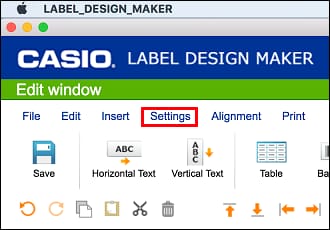
(2) On the menu bar, click "Settings" and then select "Authentication settings".
(3) After inputting the verification user name and password, click the [OK] button.
(4) Restart LABEL DESIGN MAKER.
If your Internet environment uses a proxy server that requires a user name and password for verification, you will need to pre-configure verification settings.
(1) Click "Create a new label".
(2) On the menu bar, click "Settings" and then select "Authentication settings".
(3) After inputting the verification user name and password, click the [OK] button.
(4) Restart LABEL DESIGN MAKER.


