










CT-FS1BK


One With the Music You Love — Like Never Before
Play Along, Your Way.
In Harmony from Your Very First Note.

“Feel Sync” is the latest evolution in musical immersion from CASIO that lets anyone play in harmony from the first touch of the keyboard. Begin by playing a song stored on your device using the dedicated app, then just follow along with the rhythm and play the keys however feels natural to you, anyway you like.
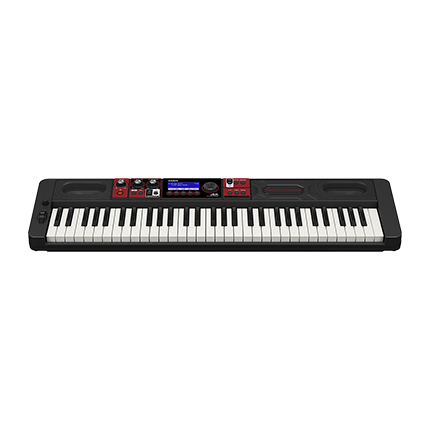
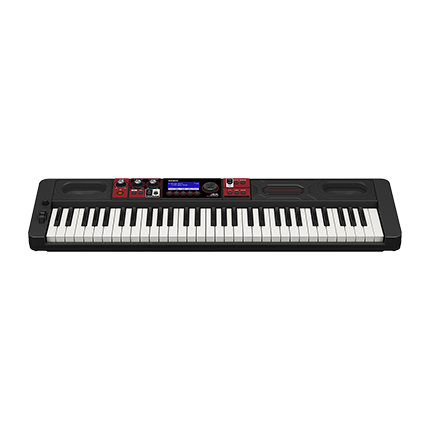
The CASIO CT-FS1 keyboard comes equipped with the Feel Sync function.
Thanks to Feel Sync, the way you play can be guided by your thoughts and feelings. It allows you to add your own form of expression to the songs you love and discover a deeper sense of joy by feeling one with the music.

Note: Feel Sync requires the use of music files that have been stored on your device. The supported file formats are WAV, AIFF, and MP3. Streaming services, which includes but is not limited to subscription-based services, are not supported by Feel Sync app.
HOW TO GET STARTED WITH FEEL SYNC
First, Download the Feel Sync App

To begin your journey with Feel Sync and the music you love, start by downloading the app using your smart device.


Connect the CT-FS1 to the App.

Plug the Wireless MIDI & Audio Adaptor (WU-BT10) that is included with the CT-FS1, into the keyboard.

Seamlessly connect via Bluetooth with the Feel Sync app.

Choose a Song You Love.

Start by selecting the option to “Add a Song” from within the app and select a music file stored on your smart device.

The selected song will then be imported from your smart device into the app.

Play Any Way You Like.

Start by tapping the ”Play” button in the app.

When the song begins playing, try playing gently and then strongly, one key at a time to the rhythm, or playing several keys together at a slower pace. Explore different ways to play that feel natural to you and your notes will naturally harmonize with the song.
HOW FEEL SYNC WORKS
First, the app analyzes the chosen song.
It accurately analyzes the chosen song’s chord progression, melody and rhythm, while CASIO’s proprietary algorithm works in the background to adjust your playing in real time. As long as you play in time with the tempo of the song, it doesn't matter what keys you press, the notes will still be adjusted to stay in harmony with the song.
You can then change the rhythm, dynamics, keyboard range, or number of notes you play to create your own unique ways to express playing your favorite songs!
WAYS TO ENJOY FEEL SYNC
Play Right Away with the Music You Love

Begin playing with a song stored on your device.
Add Your Own Accompaniment and Sing Along

Add your own accompaniments for you to sing along to! You can do this by playing the keyboard along to an instrumental track or one that doesn’t feature vocals. Enjoy singing and playing along to your own unique accompaniment!
Play Together, Your Own Way

You can use one half of the keyboard as a Feel Sync “zone” while the other half can be kept for standard playing. This allows experienced players and those who have never played a keyboard before to enjoy performing together to the same song.
DESIGN
- The keys are unified in a single color that perfectly symbolizes the Feel Sync experience. No matter which keys you play, you can feel at one with your favorite music!
- Intuitive usability with easy to use controls focused on enhancing the playing experience.
- Instant access to various functions thanks to a button layout that is designed for immediate and intuitive use.
- Effortlessly stylish design that seamlessly blends into your interior living space.
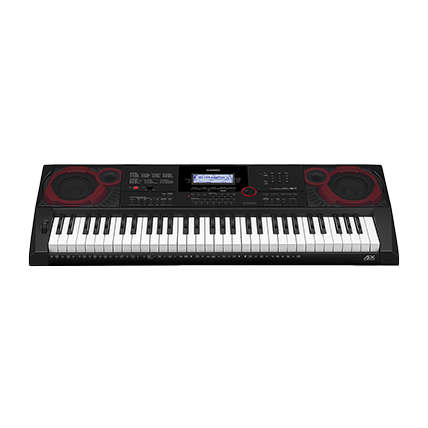
- Compact size for easy portability. It’s 258㎜ deep and 930㎜ wide, weighing just 4.5kg, which gives you more options for when and where to play it.
- The speaker net features a unique mixed color-texture fabric.
- Minimalist layout that features only the essentials – keys, speakers, and a minimal number of buttons.
- Available in two colors, white or black to match your own personal style and home décor.

Supports comfortable everyday playing and music creation.

SOUND
Sound Source

- The AiX Sound Source leverages Casio’s advanced technology for highly expressive sound.
- Detailed analysis and reproduction of the unique characteristics of acoustic, electric, and electronic instruments allows for highly realistic tones.
Tones
- A carefully curated selection of 61 tones, which includes acoustic pianos, electric pianos, strings, as well as a great many more.
Sound Samples
Acoustic System
- The Horizontal Bass-Reflex System delivers powerful sound from within a compact body.
- Volume-Sync EQ maintains the presence of the low end sounds and clarity of the high end sounds, even when played at low volumes.
EXPERIENCE
- Touch Response – add intensity and rich expression to each note you play.
- Layer Function – expand your performance range by layering two tones.
- Metronome – help keep in time during practice and performance.
- Phones / Output Jack (stereo mini phone jack (mini TRS phone)) - enjoy playing in private, away from the rest of the world.
Wireless MIDI & Audio Adaptor (WU-BT10) (Included)
- In addition to enabling the keyboard to connect to the Feel Sync app, the WU-BT10 also provides wireless connectivity to your smart device that allows for audio playback through the keyboard’s sound system as well as MIDI data transmission.
- The CASIO MUSIC SPACE app enables easy management of settings such as changing tones directly from your smart device to create a seamless playing experience.


