














FAQ | Label Printers, Disc Title Printer and Stamp Maker
Category : Features and usage Printing
Ink ribbon is coming out of the tape outlet along with the tape.
The tape cartridge was loaded while there was slack in the ink ribbon.
1. Take up any slack in the ink ribbon.
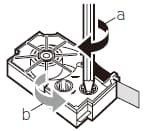
· If there is slack in the ink ribbon, insert a pencil or similar object into the upper right wheel (“a” in the nearby illustration) and rotate in the direction indicated by the arrow.
· Rotate until the lower left wheel (“b” in the illustration) starts to rotate.The tape does not move along with the ink ribbon at this time.
2. Tape pull out about 3cm.Set the tape cartridge in place.
1. Take up any slack in the ink ribbon.
· If there is slack in the ink ribbon, insert a pencil or similar object into the upper right wheel (“a” in the nearby illustration) and rotate in the direction indicated by the arrow.
· Rotate until the lower left wheel (“b” in the illustration) starts to rotate.The tape does not move along with the ink ribbon at this time.
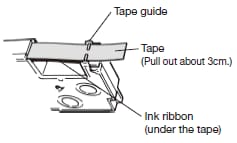
2. Tape pull out about 3cm.Set the tape cartridge in place.


