





FAQ | Label Printers, Disc Title Printer and Stamp Maker
Category : Features and usage Settings
How can I initialize it?
Follow the steps below.
1. With printer power turned on, hold down ON/Stand-by key for at least seven seconds until the power lamp and wireless LAN lamp start to flash alternately between green and orange.
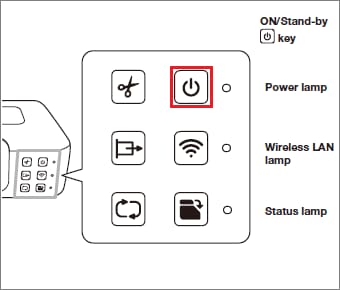
2. When initialization is complete, the power lamp will light green and the wireless LAN lamp will go out.
Important!
· Initializing settings will delete all setting information currently registered on the printer.
– Wireless LAN setting information
– Reprint data stored in printer memory
– Memory Print data stored in printer memory
· Initialization cannot be performed while printing is in progress.
1. With printer power turned on, hold down ON/Stand-by key for at least seven seconds until the power lamp and wireless LAN lamp start to flash alternately between green and orange.
2. When initialization is complete, the power lamp will light green and the wireless LAN lamp will go out.
Important!
· Initializing settings will delete all setting information currently registered on the printer.
– Wireless LAN setting information
– Reprint data stored in printer memory
– Memory Print data stored in printer memory
· Initialization cannot be performed while printing is in progress.


