















FAQ | Label Printers, Disc Title Printer and Stamp Maker
Category : PC software LABEL DESIGN MAKER for Windows
Printed text seems to be blurry.
Selecting "Error Diffusion" for the monochrome conversion method can cause printed text to be blurry.
For text, illustrations, and other simple printing, select "Simple binary".
"Error Diffusion" is recommended when printing a label that has a photograph or other color image inserted.
(1) Click the"Print/Print preview" button to display the Print Preview dialog box.
(2) Click the "Properties" in the lower right corner to display the Print Settings dialog box.
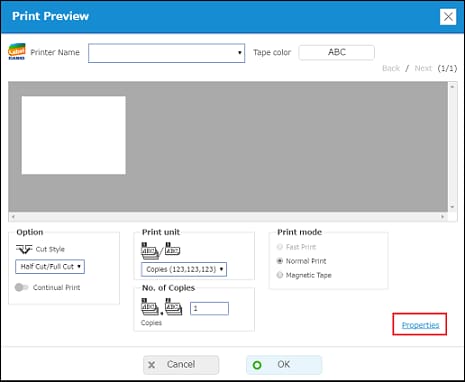
(3) Click the "Monochrome" tab and then select "Simple binary."
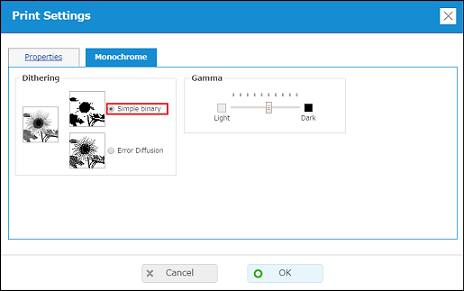
(4) Click "OK".
For text, illustrations, and other simple printing, select "Simple binary".
"Error Diffusion" is recommended when printing a label that has a photograph or other color image inserted.
(1) Click the"Print/Print preview" button to display the Print Preview dialog box.
(2) Click the "Properties" in the lower right corner to display the Print Settings dialog box.
(3) Click the "Monochrome" tab and then select "Simple binary."
(4) Click "OK".


