













FAQ | Label Printers, Disc Title Printer and Stamp Maker
Category : Features and usage Functions
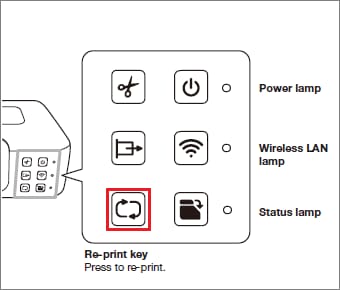
What is the (Re-print key)?
Reprint lets you re-print the last label you printed.
You can re-print even when the printer is not connected to a computer or phone.
1. Press Re-print key.
· This prints one copy of the last label that was printed.
· During printing, the status lamp flashes green.
Important!
· Even if you printed multiple copies of the last label, Reprint will print only one copy.
· Turning off printer power or initializing printer settings will clear the Reprint memory data, so re-printing of that data will not be possible.
You can re-print even when the printer is not connected to a computer or phone.
1. Press Re-print key.
· This prints one copy of the last label that was printed.
· During printing, the status lamp flashes green.
Important!
· Even if you printed multiple copies of the last label, Reprint will print only one copy.
· Turning off printer power or initializing printer settings will clear the Reprint memory data, so re-printing of that data will not be possible.


